
웹팩의 기본 개념
Webpack ·프레임 워크 팀이 아니라면 처음에 웹팩이라는 것에 대해 지나칠 수 있다.(사실 나도 초반에는 그냥 지나감…) 이번 포스트에서는 웹팩의 필수 개념에 대해 알아보고, 다음 포스트에서 실습을 통해 배워보자.
1. 웹팩이 필요한 이유
1.1 웹팩 이전의 세계와 모듈의 개념
- 웹팩은 어떻게 등장하게 되었을까? 그것을 알려면 웹팩이 없던 시절에 어떤 어려움이 있었는지에 대해서 알아보자.
- hello.js와 world.js 파일이 있다.
var word = 'Hello’;
var word = 'World’;
- 각각 word라는 변수가 다른 값을 갖고 있다. index.html에서 hello.js와 world.js를 로딩 시켜보자.
<html>
    <head>
        <script src="./source/hello.js"></script>
        <script src="./source/world.js"></script>
    </head>
    <body>
        <h1>hello, world</h1>
        <script>
            console.log(word);
        </script>
    </body>
<html>
- 모듈이라는 개념이 없던 시절에는 script 태그의 src로 hello.js와 world.js를 읽어왔다.
- 콘솔 로그에는 World라고 뜬다. world.js가 hello.js의 word를 덮어쓰기 때문이다.
- 자바스크립트에서 script 태그를 사용하여 외부의 스크립트 파일을 가져올 때에는, 파일마다 독립적인 파일 스코프를 갖지 않고 하나의 전역 객체(Global Object)를 공유한다.
- 하나의 애플리케이션에서 수백개의 자바스크립트 파일을 로드해서 사용하고 있고, 그리고 각각의 파일을 만든 사람이 서로 다르다면 심각한 충돌 문제가 생길 수 있다.
1.2 모듈의 등장
- 이런 문제를 극복하기 위해서 등장한 개념이 모듈이다. 웹 브라우저에 기본적으로 모듈의 기능이 최신 브라우저에는 탑재되어 있다. 크롬 브라우저의 경우 버전 61부터 모듈 시스템을 지원했다.(https://developer.chrome.com/blog/new-in-chrome-61/#modules)
- 모듈을 사용하고 싶은 script 태그의 type을 module이라고 써주면 된다.
<html>
    <head>
        <!-- <script src="./source/hello.js"></script>
        <script src="./source/world.js"></script> -->
    </head>
    <body>
        <h1>hello, world</h1>
        <script type="module">
            import hello_word from "./source/hello.js";
            import world_word from "./source/world.js";
            console.log(hello_word);
            console.log(world_word);
        </script>
    </body>
<html>
var word  = 'Hello’;
export default word;
var word  = 'World’;
export default word;
- 이렇게하면 hello.js 모듈을 import하는 쪽에서는 export default 뒤에 있는 값을 사용할 수 있다. 그리고 word라는 값을 접근 할 수 없다. word는 해당 모듈 내에서만 유효한 값이 된다. 이것이 모듈의 개념이다.
- 안타깝게도 모든 브라우져에서 모듈 시스템을 지원하지 않는다. 인터넷 익스플로러를 포함한 몇 브라우저에서는 여전히 모듈을 사용하지 않는다.
- 그리고 위의 경우 서버로부터 hello.js와 world.js 파일을 다운받게 된다. 하지만 다운로드 받은 파일이 두 개가 아니라 css 파일, img 파일을 포함해 수백 개라고 가정하면, 네트워크 커넥션이 많아지게 되면서 로딩 속도가 느려지게 된다. http/2에서는 하나의 커넥션에서 여러 파일들을 요청할 수 있지만, 우리가 주로 사용하는 http/1.1에서는 하나의 커넥션에서 하나씩 요청을 보내야 한다. 즉, 하나의 요청이 끝나야 다음 요청을 보낼 수 있기 때문에 파일의 수가 많을수록 비효율적이다.
1.3 모듈이란
- 모듈은 단지 파일 하나에 불과하다. 스크립트 하나는 모듈 하나다.
- 모듈에 특수한 지시자 export와 import를 적용하면 다른 모듈을 불러와 불러온 모듈에 있는 함수를 호출하는 것과 같은 기능 공유가 가능하다.
- 모듈은 자신만의 스코프가 있다. 따라서 모듈 내부에서 정의한 변수나 함수는 다른 스크립트에서 접근할 수 없다.
- 오래전부터 웹에서도 모듈의 개념을 사용하고 싶어했고, 여러 개의 파일을 하나로 묶어서 제공하기 위해 탄생한 것이 번들러이고, 번들러 도구의 대표주자가 웹팩이다.
번들링이란
- 아래 그림과 같이 웹 애플리케이션을 구성하는 몇십, 몇백개의 자원들을 하나의 파일로 병합 및 압축 해주는 동작을 모듈 번들링이라고 한다.
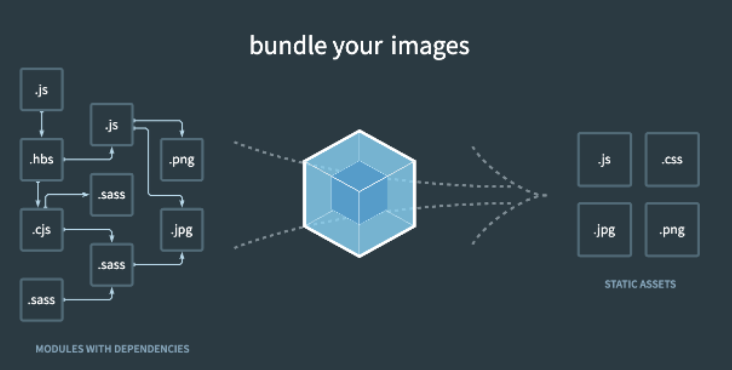
- 빌드, 번들링, 변환 이 세 단어 모두 같은 의미다.
2. 웹팩
- 모듈로 연결된 여러 개의 자바스크립트 파일을 하나의 파일로 합쳐주는 모듈 번들러이다. 웹팩은 프론트엔드 프레임워크에서 가장 많이 사용되는 모듈 번들러이다.
- 모듈로 개발을 하면 모듈 간 의존 관계가 형성 된다. 하나의 자바 스크립트 파일에서 다른 모듈을 import하는 방식이다. 웹팩은 하나의 시작점(entry point)으로부터 의존적인 모듈을 전부 찾아내서 하나의 결과물을 만들어 낸다.
2.1 웹팩 설치
- 번들 작업을 하는 webpack 패키지와 웹팩 터미널 도구인 webpack-cli를 설치하는 방법은 아래와 같다.
npm install -D webpack webpack-cli
- npm으로 설치했기 때문에 package.json의 devDependencies에 설치한 webpack 정보가 있다. 그리고 node_modules의 .bin 폴더에 webpack이 설치되어 있다. 이것을 통해 webpack을 터미널에서 실행할 수 있다.
2.2 웹팩의 3가지 필수 옵션
- webpack을 실행할 때에는 필요한 옵션이 3개 있다.(mode, entry, output)
node_modules/.bin/webpack --help
- 위 커맨드의 결과는 아래와 같다.
--mode : Enable production optimizations or development hints.
[선택: "development", "production", "none"]
-- entry : The entry point(s) of the compilation.
-- output : The output path and file for compilation assets
-- config : Path to the config file
[문자열] [기본: webpack.config.js or webpackfile.js]
...
...
- mode 옵션의 경우, 개발용 정보를 추가하려면 development, 배포하기 위한 최적화 설정을 하려면 production 옵션을 설정한다.
- entry 옵션은 모듈의 시작점이다.
- output 옵션은 entry를 통해서 웹팩은 모든 모듈들을 하나로 합치고 결과의 경로를 저장하는 옵션이다.
- config 옵션은 웹팩 설정파일의 경로를 지정할 수 있는데 기본 파일명이 webpack.config.js 이다.
2.3 로더
- 로더(Loader)는 웹팩이 웹 애플리케이션을 해석할 때 자바스크립트 파일이 아닌 웹 자원(HTML, CSS, Images, 폰트 등)들을 변환할 수 있도록 도와주는 속성이다.
- 로더는 모든 파일을 자바스크립트의 모듈처럼 만들어준다. CSS 파일 등을 import 구문을 사용하면 자바스크립트 코드 안으로 가져 올 수 있도록 하고, 이미지 같은 파일을 url 형식의 문자열로 변환해 자바스크립트에서 이미지 파일을 사용할 수 있도록 한다.
module: {
        rules: [
            {
                test: /\.css$/,
                use: [MiniCssExtractPlugin.loader, "css-loader"]
            }
          ]
    },
- 로더는 module 객체의 rules 배열에 추가할 수 있다. rules 배열에는 test와 use라는 key를 갖는 객체를 사용한다. test에는 로더가 처리해야하는 파일들의 패턴(정규 표현식)을 입력한다. use에는 사용할 로더를 명시한다.