
Vanilla JS로 로그인 form 만들기
ToyProject ·순수 자바스크립트를 이용해 로그인 form을 만들어보자.
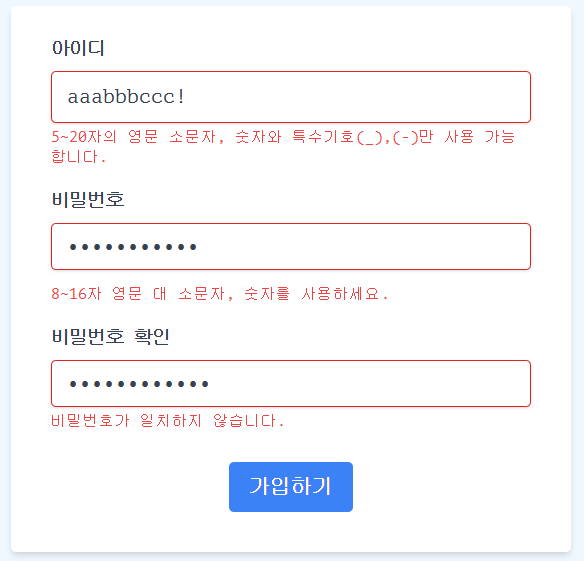
과제 조건
- autofocus
- 페이지가 로드 된 시점에 ID 입력 창에 Focus하기
- 유효성 검사 로직
- ID, 비밀번호, 비밀번호 확인 필드에 대한 유효성 검사를 수행
- 유효성 검사 시점
- input focus out 시 해당 input의 유효성을 검사
- 가입하기 버튼을 눌렀을 때 모든 필드의 유효성을 검사
- 유효성 검사 패턴
- 모든 필드의 값은 빠짐 없이 입력 해야함
- ID: 5~20자. 영문 소문자, 숫자. 특수기호(_),(-)만 사용 가능
- 비밀번호: 8~16자. 영문 대/소문자, 숫자 사용 가능
- 비밀번호 확인: 비밀번호와 일치
- 커스텀 에러 메세지
- (공통) 빈 값일 경우: 필수 정보입니다.
- [ID] 유효하지 않은 값일 경우: “5~20자의 영문 소문자, 숫자와 특수기호(_),(-)만 사용 가능합니다.”
- [비밀번호] 유효하지 않은 값일 경우: “8~16자 영문 대 소문자, 숫자를 사용하세요.”
- [비밀번호 확인] 유효하지 않은 값일 경우: “비밀번호가 일치하지 않습니다.”
- 입력 확인 모달 창
- 제출하기 버튼 클릭 시, 모든 input의 값이 유효한 상태일 경우 입력한 아이디와 비밀번호를 확인할 수 있는 모달 창을 보여주기
- “취소하기” 버튼 클릭 시 모달 창이 닫힘
- “가입하기” 버튼 클릭 시 윈도우의 alert 창을 이용해 “가입되었습니다 🥳 “ 라는 메시지를 출력
- 폰트 사이즈 조절 버튼
- 회원가입 폼에 사용된 기본 폰트 사이즈는 16px
- 기본 폰트 사이즈를 기준으로 1px씩 폰트 사이즈를 조절할 수 있는 기능을 구현(최소: 12px, 최대: 20px, 아닐시 비활성화)
autofocus
document.addEventListener('DOMContentLoaded', () => {
    if ($id) {
        $id.focus()
    }
})
- HTML5에서 적용 가능한 autofocus 속성으로도 가능하지만, eventListener를 설정했다. DOMContentLoaded 이벤트는 DOM이 완전히 로드되었을때 콜백 함수를 실행한다.
유효성 검사와 에러 메세지
$id.addEventListener('focusout', () => checkValidation($id, $idMsg))

$pw.addEventListener('focusout', () => checkValidation($pw, $pwMsg))

$pwCheck.addEventListener('focusout', () =>
    checkValidation($pwCheck, $pwCheckMsg)
)

const ERROR_MSG = {
    required: '필수 정보입니다.',
    invalidId:
        '5~20자의 영문 소문자, 숫자와 특수기호(_),(-)만 사용 가능합니다.',
    invalidPw: '8~16자 영문 대 소문자, 숫자를 사용하세요.',
    invalidPwCheck: '비밀번호가 일치하지 않습니다.',
}

const checkRegex = (target) => {
    const { value, id } = target
    if (value.length === 0) {
        return 'required'
    } else {
        switch (id) {
            case 'id':
                return ID_REGEX.test(value) ? true : 'invalidId'
            case 'pw':
                return PW_REGEX.test(value) ? true : 'invalidPw'
            case 'pw-check':
                return $pw.value === $pwCheck.value ? true : 'invalidPwCheck'
        }
    }
}

const checkValidation = (target, msgTarget) => {
    // 모든 필드의 값은 빠짐 없이 입력해야 합니다.
    // ID: 5~20자. 영문 소문자, 숫자. 특수기호(_),(-)만 사용 가능
    const isValid = checkRegex(target)

    // 3. 커스텀 에러 메세지
    // (1) 비어 있을 때 : input 태그에 border-red-600 class 추가
    // (2) 유효하지 않을 때
    if (isValid !== true) {
        target.classList.add('border-red-600')
        msgTarget.innerText = ERROR_MSG[isValid]
    } else {
        target.classList.remove('border-red-600')
        msgTarget.innerText = ''
    }

    return isValid
}
- 우선 정규 표현식에 대해 유효한지에 대해 검사를 하는 checkRegex 메서드를 구현했다.
- 값이 비어 있으면 ‘required’ 메세지를 반환하고, ID, 비밀번호, 비밀번호 확인 필드에 대해 패턴 검사 후 유효하다면 true 불린 값을 반환하고, 아닌 경우는 invalid 메세지를 반환하도록 했다.
- checkValidation 메서드에서 targetElement에 대해 checkRegex를 수행하고, inValid인 경우 msgTargetElement의 innerText를 ERROR_MSG 객체의 필드에 해당하는 에러 메세지로 설정했다.
- 가독성과 한 곳에 모아 관리하기 편하기 위해 ERROR_MSG 객체 만들어 필드별로 에러 메세지들을 정의해 관리했다.
입력 확인 모달 창
<input
    id="submit"
    type="submit"
    value="가입하기"
/>

<dialog id="modal" class="rounded-lg shadow-xl text-left">
</dialog>
- input 태그의 type이 submit인 경우 클릭 시 브라우저의 기본 동작은 폼을 제출하는 것이다. 따라서 폼이 제출되면 페이지가 새로고침되거나 지정된 action URL로 이동한다.
const $modal = document.getElementById('modal')
$submit.addEventListener('click', (e) => {
    e.preventDefault()
    if (
        checkValidation($id, $idMsg) === true &&
        checkValidation($pw, $pwMsg) === true &&
        checkValidation($pwCheck, $pwCheckMsg) === true
    ) {
        const $confirmId = document.getElementById('confirm-id')
        const $confrimPw = document.getElementById('confirm-pw')
        $confirmId.innerText = $id.value
        $confrimPw.innerText = $pw.value
        $modal.showModal()
    }
})
- ID, 패스워드, 패스워드 확인 필드가 모두 유효한 경우, 아이디와 비밀번호를 모두 확인할 수 있는 모달 창을 보여준다.
- dialog 태그를 열기 위해 showModal 메서드를 이용했다.
폰트 사이즈 조절
$increaseFontBtn.addEventListener('click', () => {
    onClickFontsizeControl('increase')
})

$decreaseFontBtn.addEventListener('click', () => {
    onClickFontsizeControl('decrease')
})

const onClickFontsizeControl = (flag) => {
    const curFontSize = parseFloat(window.getComputedStyle($html).fontSize)
    let nextFontSize = flag === 'increase' ? curFontSize + 1 : curFontSize - 1
    $html.style.fontSize = nextFontSize

    $increaseFontBtn.disabled = nextFontSize >= MAX_FONT_SIZE
    $decreaseFontBtn.disabled = nextFontSize <= MIN_FONT_SIZE
}
- button 태그의 disabled 속성을 이용했다.
- button 컨트롤을 이용해 html 태그의 fontSize를 변경하거나, 해당 버튼 컨트롤을 diable하는 공통의 기능을 수행하기 때문에, onClickFontsizeControl 하나의 메서드에서 input flag로 구분해 기능을 수행했다.