
40장 이벤트
Modern JavaScript DeepDive ·40.1 이벤트 드리븐 프로그래밍
- 브라우저는 처리해야 할 특정 사건이 발생하면 이를 감지하여 이벤트를 발생시킨다.
- 만약 애플리케이션이 특정 타입의 이벤트에 대해 반응하여 어떤 일을 하고 싶다면 해당하는 타입의 이벤트가 발생했을 때 호출될 함수를 브라우저에게 알려 호출을 위임한다. 이때 이벤트가 발생했을 때 호출될 함수를 이벤트 핸들러라 하고. 이벤트가 발생했을 때 브라우저에게 이벤트 핸들러의 호출을 위임하는 것을 이벤트 핸들러 등록이라 한다.
- 브라우저는 사용자의 버튼 클릭을 감지하여 클릭 이벤트를 발생시킬 수 있다. 그리고 특정 버튼 요소에서 클릭 이벤트가 발생하면 특정 함수(이벤트 핸들러)를 호출하도록 브라우저에게 위임(이벤트 핸들러 등록)할 수 있다. 즉, 함수를 언제 호출할지 알 수 없으므로 개발자가 명시적으로 함수를 호출하는 것이 아니라 브라우저에게 함수 호출을 위임하는 것이다. 이를 코드로 표현하면 다음과 같다.
<!DOCTYPE html>
<html>
    <body>
        <button>Click me!</button>
            <script>
                const $button = document.querySelector('button');
                // 사용자가 버튼을 클릭하면 함수를 호출하도록 요청
                $button.onclick =()=>{ alert('button click'); };
            </script>
    </body>
</html>
- 위 예제를 살펴보면 버튼 요소 $button의 onclick 프로퍼티에 함수를 할당했다. 나중에 설명하겠지만 Window, Document, HTMLElement 타입의 객체는 onclick과 같이 특정 이벤트에 대응하는 다양한 이벤트 핸들러 프로퍼티를 가지고 있다. 이 이벤트 핸들러 프로퍼티에 함수를 할당하면 해당 이벤트가 발생했을 때 할당한 함수가 브라우저에 의해 호출된다.
- 이처럼 이벤트와 그에 대응하는 함수(이벤트 핸들러)를 통해 사용자와 애플리케이션은 상호작용(interaction)을 할수 있다. 이와 같이 프로그램의 흐름을 이벤트 중심으로 제어하는 프로그래밍 방식을 이벤트 드리븐 프로그래 밍이라 한다.
40.2 이벤트 타입
- 이벤트 타입은 이벤트의 종류를 나타내는 문자열이다. 예를들어, 이벤트 타입 ‘click’은사용자가 마우스 버튼을 클릭했을 때 발생하는 이벤트를 나타낸다. 이벤트 타입은 약 200여 가지가 있다.
40.3 이벤트 핸들러 등록
- 이벤트 핸들러(event handler 또는 event listener)는 이벤트가 발생했을 때 브라우저에 호출을 위임한 함수다. 다시 말해, 이벤트가 발생하면 브라우저에 의해 호출될 함수가 이벤트 핸들러다.
- 이벤트가 발생했을 때 브라우저에게 이벤트 핸들러의 호출을 위임하는 것을 이벤트 핸들러 등록이라 한다. 이벤트 핸들러를 등록하는 방법은 3가지다
40.3.1 이벤트 핸들러 어트리뷰트 방식
- HTML 요소의 어트리뷰트 중에는 이벤트에 대응하는 이벤트 핸들러 어트리뷰트가 있다. 이벤트 핸들러 어트리뷰트의 이름은 onclick과 같이 on 접두사와 이벤트의 종류를 나타내는 이벤트 타입으로 이루어져 있다. 이벤트 핸들러 어트리뷰트 값으로 함수 호출문 등의 문을 할당하면 이벤트 핸들러가 등록된다.
<!DOCTYPE html>
<html>
    <body>
        <button onclick="sayHi('Lee')">Click me!</button>
            <script>
                function sayHi(name) {
                console.log('Hi! ${name}.');
                }
            </script>
    </body>
</html>
- 주의할 점은 이벤트 핸들러 어트리뷰트 값으로 함수 참조가 아닌 함수 호출문 등의 문을 할당한다는 것이다.
- 이벤트 핸들러 등록이란 함수 호출을 브라우저에게 위임하는 것이라 했다. 따라서 이벤트 핸들러를 등록할 때 콜백 함수와 마찬가지로 함수 참조를 등록해야 브라우저가 이벤트 핸들러를 호출할 수 있다. 만약 함수 참조가 아니라 함수 호출문을 등록하면 함수 호출문의 평가 결과가 이벤트 핸들러로 등록된다. 함수가 아닌 값을 반환하는 함수 호출문을 이벤트 핸들러로 등록하면 브라우저가 이벤트 핸들러를 호출할 수 없다.
- 하지만 위 예제에서는 이벤트 핸들러 어트리뷰트 값으로 함수 호출문을 할당했다. 이때 이벤트 핸들러 어트리뷰트 값은 사실 암묵적으로 생성될 이벤트 핸들러의 함수 몸체를 의미한다. 즉, onclick=”sayHi( ‘Lee’)” 어트리뷰트는 파싱되어 다음과 같은 함수를 암묵적으로 생성하고, 이벤트 핸들러 어트리뷰트 이름과 동일한 키 onclick 이벤트 핸들러 프로퍼티에 할당한다.
function onclick(event) {
    sayHi('Lee');
}
- 이처럼 동작하는 이유는 이벤트 핸들러에 인수를 전달하기 위해서다. 만약 이벤트 핸들러 어트리뷰트 값으로 함수 참조를 할당해야 한다면 이벤트 핸들러에 인수를 전달하기 곤란하다.
- 결국 이벤트 핸들러 어트리뷰트 값으로 할당한 문자열은 암묵적으로 생성되는 이벤트 핸들러의 함수 몸체다. 따라서 이벤트 핸들러 어트리뷰트 값으로 다음과 같이 여러 개의 문을 할당할 수 있다.
<button onclick="console.log('Hi!'); console.l.og('Lee');">Click me!</button>
- 이벤트 핸들러 어트리뷰트 방식은 오래된 코드에서 간혹 이 방식을 사용한 것이 있기 때문에 알아둘 필요는 있지만 더는 사용하지 않는 것이 좋다.
40.3.2 이벤트 핸들러 프로퍼티 방식
- window 객체와 Document, HTMLElement 타입의 DOM 노드 객체는 이벤트에 대응하는 이벤트 핸들러 프로퍼티를 가지고 있다. 이벤트 핸들러 프로퍼티의 키는 이벤트 핸들러 어트리뷰트와 마찬가지로 onclick과 같이 on 접두사와 이벤트의 종류를 나타내는 이벤트 타입으로 이루어져 있다. 이벤트 핸들러 프로퍼티에 함수를 바인딩하면 이벤트 핸들러가 등록된다.
<!DOCTYPE html>
<html>
    <body>
        <button>Click me!</button>
            <script>
                const $button = document.querySelector('button');
                // 이벤트 핸들러 프로퍼티에 이벤트 핸들러를 바인딩
                $button.onclick function () {
                    console.log('button click');
                };
            </script>
    </body>
</html>
- 이벤트 핸들러를 등록하기 위해서는 이벤트를 발생시킬 객체인 이벤트 타깃과 이벤트의 종류를 나타내는 문자열인 이벤트 타입 그리고 이벤트 핸들러를 지정할 필요가 있다. 이벤트 핸들러는 대부분 이벤트를 발생시킬 이벤트 타깃에 바인딩한다.
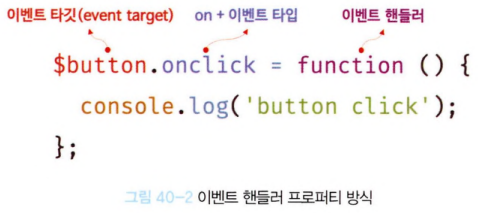
- 앞서 살펴본 “이벤트 핸들러 어트리뷰트 방식”도 결국 DOM 노드 객체의 이벤트 핸들러 프로퍼티로 변환되므로 결과적으로 이벤트 핸들러 프로퍼티 방식과 동일하다고 할 수 있다.
- “이벤트 핸들러 프로퍼티 방식”은 “이벤트 핸들러 어트리뷰트 방식”의 HTML과 자바스크립트가 뒤섞이는 문제를 해결할 수 있다. 하지만 이벤트 핸들러 프로퍼티에 하나의 이벤트 핸들러만 바인딩할 수 있다는 단점이 있다.
40.3.3 addEventListener 메서드 방식
- EventTarget.prototype.addEventListener 메서드를 사용하여 이벤트 핸들러를 등록할 수 있다.
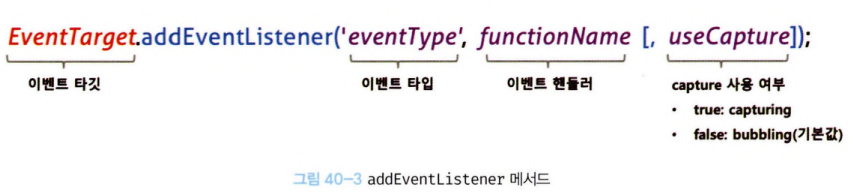
- addEventListener 메서드의 첫 번째 매개변수에는 이벤트의 종류를 나타내는 문자열인 이벤트 타입을 전달한다. 이때 이벤트 핸들러 프로퍼티 방식과는 달리 on 접두사를 붙이지 않는다. 두 번째 매개변수에는 이벤트 핸들러를 전달한다. 마지막 매개변수에는 이벤트를 캐치할 이벤트 전파 단계(캡처링 또는 버블링)를 지정한다. 생략하거나 false를 지정하면 버블링 단계에서 이벤트를 캐치하고, true를 지정하면 캡처링 단계에서 이벤트를 캐치한다.
<!D0CTYPE html>
<html>
    <body>
        <button>Click me!</button>
        <script>
            const $button = document.querySelector('button');
            // 이벤트 핸들러 프로퍼티 방식
            // $button.onclick = function () {
            // console.log('button click');
            // };
            // addEventListener 메서드 방식
            $button.addEventListener('click', function () {
            console.log('button click');
            });
        </script>
    </body>
</html>
- 이벤트 핸들러 프로퍼티 방식은 이벤트 핸들러 프로퍼티에 이벤트 핸들러를 바인딩하지만 addEventListener 메서드에는 이벤트 핸들러를 인수로 전달한다.
- 만약 동일한 HTML 요소에서 발생한 동일한 이벤트에 대해 이벤트 핸들러 프로퍼티 방식과 addEventListener 메서드 방식을 모두 사용하여 이벤트 핸들러를 등록하면 어떻게 동작할지 생각해보자. addEventListener 메서드 방식은 이벤트 핸들러 프로퍼티에 바인딩된 이벤트 핸들러에 아무런 영향을 주지 않는다. 따라서 버튼 요소에서 클릭 이벤트가 발생하면 2개의 이벤트 핸들러가 모두 호출된다.
- 동일한 HTML 요소에서 발생한 동일한 이벤트에 대해 이벤트 핸들러 프로퍼티 방식은 하나 이상의 이벤트 핸들러를 등록할 수 없지만 addEventListener 메서드는 하나 이상의 이벤트 핸들러를 등록할 수 있다. 이때 이벤트 핸들러는 등록된 순서대로 호출된다.
- 단, addEventListener 메서드를 통해 참조가 동일한 이벤트 핸들러를 중복 등록하면 하나의 이벤트 핸들러만 등록된다.
40.4 이벤트 핸들러 제거
- addEventListener 메서드로 등록한 이벤트 핸들러를 제거하려면 EventTarget.prototype.removeEventListener 메서드를 사용한다. 단, addEventListener 메서드에 전달한 인수와 removeEventListener 메서드에 전달한 인수가 일치하지 않으면 이벤트 핸들러가 제거되지 않는다.
<!DOCTYPE html>
<html>
    <body>
        <button>Click me!</button>
        <script>
            const $button = document.querySelector('button');
            const handleClick = () => console.log('button click');
            // 이벤트 핸들러 등록
            $button.addEventListener('click', handleClick);
            // 이벤트 핸들러 제거
            // addEventListener 머/서드에 전달한 인수와 removeEventListener 메서드에
            // 전달한 안수가 일치하지 않으면 이벤트 핸들러가 제거되지 않는다.
            $button.removeEventListener('click', handleClick, true); // 실패
            $button.removeEventListener('click', handleClick); // 성공
        </script>
    </body>
</html>
- 다음과 같이 무명 함수를 이벤트 핸들러로 등록한 경우 제거할 수 없다. 이벤트 핸들러를 제거하려면 이벤트 핸들러의 참조를 변수나 자료구조에 저장하고 있어야한다.
// 이벤트 핸들러 등록
$button.addEventListener('click', () => console.log('button click'));
// 등록한 이벤트 핸들러를 참조할 수 없으므로 저/거할 수 없다.
- 단, 기명 이벤트 핸들러 내부에서 removeEventListener 메서드를 호출하여 이벤트 핸들러를 제거하는 것은 가능하다. 이때 이벤트 핸들러는 단 한 번만 호출된다. 다음 예제의 경우 버튼 요소를 여러 번 클릭해도 단 한번만 이벤트 핸들러가 호출된다.
// 기명 함수를 이벤트 핸들러로 등록'
$button.addEventListener('click', function foo() {
    console.log('button click');
    // 이벤트 핸들러를 제거한다. 따라서 이벤트 핸들러는 단 한 번만 호출된다.
    $button.removeEventListener('click', foo);
});
- 이벤트 핸들러 프로퍼티 방식으로 등록한 이벤트 핸들러는 removeEventListener 메서드로 제거할 수 없다. 이벤트 핸들러 프로퍼티 방식으로 등록한 이벤트 핸들러를 제거하려면 이벤트 핸들러 프로퍼티에 null을 할당한다.
const $button = document.querySelector('button');
$button.onclick = null;
40.5 이벤트 객체
- 이벤트가 발생하면 이벤트에 관련한 다양한 정보를 담고 있는 이벤트 객체가 동적으로 생성된다. 생성된 이벤트 객체는 이벤트 핸들러의 첫 번째 인수로 전달된다.
<!DOCTYPE html>
<html>
    <body>
        <p>클릭하세요. 클릭한 곳의 좌표가 표시됩니다.</p>
        <em class= "message"></em>
        <script>
            const $msg = document.querySelector('.message');
            // 클릭 이벤트에 의해 생성된 이벤트 객체 이벤트 핸들러의 첫 번째 인수로 전달된다.
            function showCoords(e) {
                $msg.textContent = 'clientX : ${e.clientX}, clientY: ${e.clientY}';
            }
            document.onclick = showCoords;
        </script>
    </body>
</html>
- 클릭 이벤트에 의해 생성된 이벤트 객체는 이벤트 핸들러의 첫 번째 인수로 전달되어 매개변수 e에 암묵적으로 할당된다. 이는 브라우저가 이벤트 핸들러를 호출할 때 이벤트 객체를 인수로 전달하기 때문이다. 따라서 이벤트 객체를 전달받으려면 이벤트 핸들러를 정의할 때 이벤트 객체를 전달받을 매개변수를 명시적으로 선언해야 한다.
40.5.1 이벤트 객체의 상속 구조
- 이벤트가 발생하면 이벤트 타입에 따라 다양한 타입의 이벤트 객체가 생성된다. 이벤트 객체는 다음과 같은 상속 구조를 갖는다.
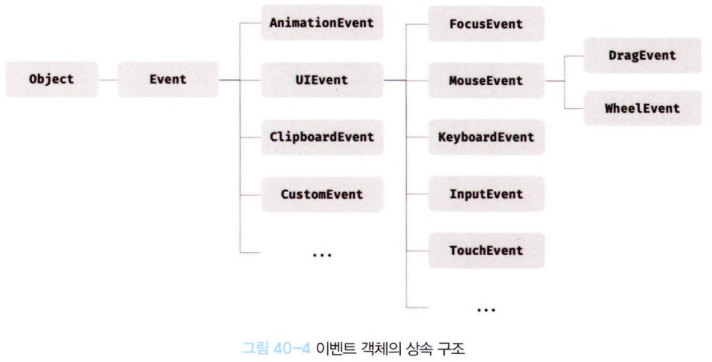
- 위 그림의 Event, UIEvent, MouseEvent 등 모두는 생성자 함수다. 따라서 다음과 같이 생성자 함수를 호출하여 이벤트 객체를생성할 수 있다.
// Event 생성자 함수를 호출하여 foo 이벤트 타입의 Event 객체를 생성한다.
let e = new Event('foo');
console.log(e);
// Event {isTrusted: false, type: "foo", target: null, ... }
console.log(e.type); // "foo"
console.log(e instanceof Event); // true
console.log(e instanceof Object); // true
// FocusEvent 생성자 함수를 호출하여 focus 이벤트 타입의 FocusEvent 객체를 생성한다.
e = new FocusEvent('focus');
console.log(e);
// FocusEvent {isTrusted: false, relatedTarget: null, view: null, ... }
- 이처럼 이벤트가 발생하면 암묵적으로 생성되는 이벤트 객체도 생성자 함수에 의해 생성된다. 그리고 생성된 이벤트 객체는 생성자 함수와 더불어 생성되는 프로토타입으로 구성된 프로토타입 체인의 일원이 된다.
- Event 인터페이스는 DOM 내에서 발생한 이벤트에 의해 생성되는 이벤트 객체를 나타낸다. Event 인터페이스에는 모든 이벤트 객체의 공통 프로퍼티가 정의되어 있고 FocusEvent, MouseEvent, KeyboardEvent, WheelEvent 같은 하위 인터페이스에는 이벤트 타입에 따라 고유한 프로퍼티가 정의되어 있다.
40.5.2 이벤트 객체의 공통 프로퍼티
- Event 인터페이스, 즉 Event.prototype에 정의되어 있는 이벤트 관련 프로퍼티는 UIEvent, CustomEvent, MouseEvent 등 모든 파생 이벤트 객체에 상속된다. 즉, Event 인터페이스의 이벤트 관련 프로퍼티는 모든 이벤트 객체가 상속받는 공통 프로퍼티다. 이벤트 객체의 공통 프로퍼티는 다음과 같다.
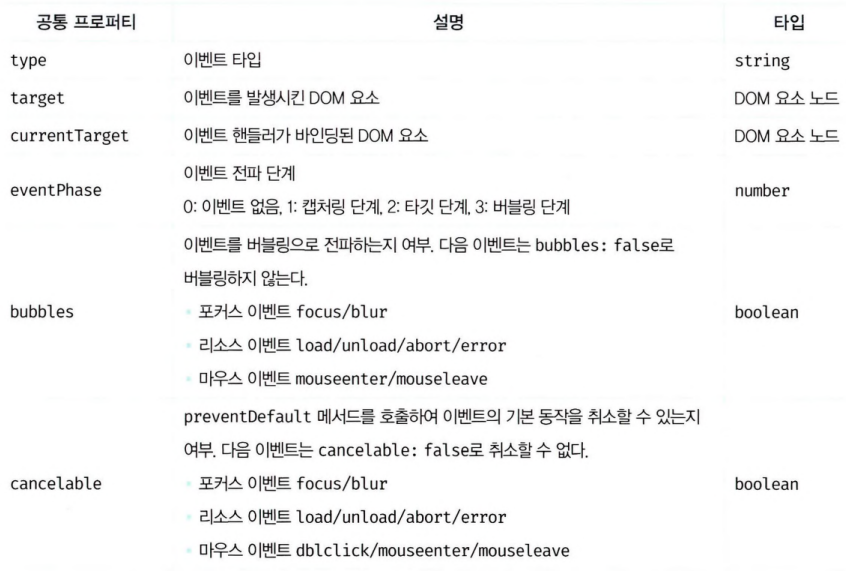
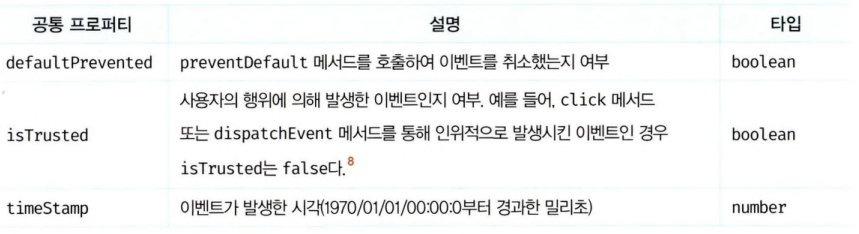
- 일반적으로 이벤트 객체의 target 프로퍼티와 currentTarget 프로퍼티는 동일한 DOM 요소를 가리키지만 나중에 살펴볼 이벤트 위임에서는 이벤트 객체의 target 프로퍼티와 currentTarget 프로퍼티가 서로 다른 DOM 요소를 가리킬 수 있다.
40.5.3 마우스 정보 취득
- click, dblclick, mousedown, mouseup, mousemove, mouseenter, mouseleave 이벤트가 발생하면 생성되는 MouseEvent 타입의 이벤트 객체는 다음과 같은 고유의 프로퍼티를 갖는다.
- 마우스 포인터의 좌표 정보를 나타내는 프로퍼티: screenX/screenY, clientX/clientY, pageX/pageY, offsetX/offsetY
- 버튼 정보를 나타내는 프로퍼티: altKey, ctrlKey, shiftKey, button
- 이 프로퍼티 중에서 clientX/clientY는 뷰포트(viewport), 즉 웹페이지의 가시 영역을 기준으로 마우스 포인터 좌표를 나타낸다.
40.5.4 키보드 정보 취득
- keydown, keyup, keypress 이벤트가 발생하면 생성되는 KeyboardEvent 타입의 이벤트 객체는 altKey, ctrlKey, shiftKey, metaKey, key, keyCode 같은 고유의 프로퍼티를 갖는다.
- keyup 이벤트가 발생하면 생성되는 KeyboardEvent 타입의 이벤트 객체는 입력한 키 값을 문자열로 반환하는 key 프로퍼티를 제공한다. 엔터 키의 경우 key 프로퍼티는 ‘Enter’를 반환한다.
40.6 이벤트 전파
- DOM 트리 상에 존재하는 DOM 요소 노드에서 발생한 이벤트는 DOM 트리를 통해 전파된다. 이를 이벤트 전파(event propagation)라고 한다. 예를 들어, 다음 예제를 살펴보자.
<!DOCTYPE html>
<html>
<body>
    <ul id=”fruits”>
        <li id=”apple”>Apple</li>
        <li id=”banana">Banana</li>
        <li id=“orange”>Orange</li>
    </ul>
</body>
</html>
- ul 요소의 두 번째 자식 요소인 li 요소를 클릭하면 클릭 이벤트가 발생한다. 이때 생성된 이벤트 객체는 이벤트를 발생시킨 DOM 요소인 이벤트 타깃을 중심으로 DOM 트리를 통해 전파된다. 이벤트 전파는 이벤트 객체가 전파되는 방향에 따라 다음과 같이 3단계로 구분할 수 있다.
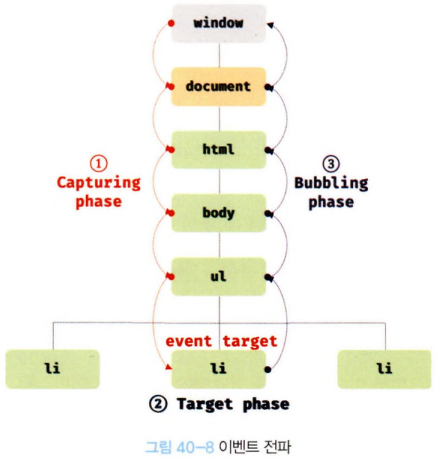
- 캡처링 단계(capturing phase): 이벤트가 상위 요소에서 하위 요소 방향으로 전파
- 타깃 단계(target phase): 이벤트가 이벤트 타깃에 도달
-
버블링 단계(bubbling phase): 이벤트가 하위 요소에서 상위 요소 방향으로 전파
- 다음 예제와 같이 ul 요소에 이벤트 핸들러를 바인딩하고 Ul 요소의 하위 요소인 li 요소를 클릭하여 이벤트를 발생시켜 보자. 이때 이벤트 타깃(event.target)은 li 요소이고 커런트 타깃(event.currentTarget)은 ul 요소다.
<!DOCTYPE html>
<html>
    <body>
        <ul id= "fruit">
            <li id= "apple">Apple</li>
            <li id= "banana">Banana</li>
            <li id= "orange">Orange</li>
        </ul>
        <script>
            const $fruits = document.getElementById('fruit');
            // itfruits 요소의 하위 요소인 li 요소를 클릭한 경우
            $fruits.addEventListener('click', e => {
                console.log( ${e eventPhase} ); // 3: 버블링 단계
                console.log('이벤트 타깃: ${e. target}'); // [object HTMLLIElement]
                console.log('커런트 타깃: ${e.currentTarget}'); // [object HTMLUListElement]
            });
        </script>
    </body>
</html>
- li 요소를 클릭하면 클릭 이벤트가 발생하여 클릭 이벤트 객체가 생성되고 클릭된 li 요소가 이벤트 타깃이 된다. 이때 클릭 이벤트 객체는 window에서 시작해서 이벤트 타깃 방향으로 전파된다. 이것이 캡처링 단계다.
- 이후 이벤트 객체는 이벤트를 발생시킨 이벤트 타깃에 도달한다. 이것이 타깃 단계다.
- 이후 이벤트 객체는 이벤트 타깃에서 시작해서 window 방향으로 전파된다. 이것이 버블링 단계다.
- addEventListener 메서드 방식으로 등록한 이벤트 핸들러는 타깃 단계와 버블링 단계뿐만 아니라 캡처링 단계의 이벤트도 선별적으로 캐치할 수 있다. 캡처링 단계의 이벤트를 캐치하려면 addEventListener 메서드의 3번째 인수로 true를 전달해야 한다. 3번째 인수를 생략하거나 false를 전달하면 타깃 단계와 버블링 단계의 이벤트만 캐치할 수 있다.
- 이벤트는 이벤트를 발생시킨 이벤트 타깃은 물론 상위 DOM 요소에서도 캐치할 수 있다.
- 대부분의 이벤트는 캡처링과 버블링을 통해 전파된다. 하지만 다음 이벤트는 버블링을 통해 전파되지 않는다. 이 이벤트들은 버블링을 통해 이벤트를 전파하는지 여부를 나타내는 이벤트 객체의 공통 프로퍼티 event.bubbles의 값이 모두 false다.
- 포커스 이벤트: focus/blur
- 리소스 이벤트: load/unload/abort/error
- 마우스 이벤트: mouseenter/mouseleave
- 위 이벤트는 버블링되지 않으므로 이벤트 타깃의 상위 요소에서 위 이벤트를 캐치하려면 캡처링 단계의 이벤트를 캐치해야 한다.
- 하지만 위 이벤트를 상위 요소에서 캐치해야 할 경우는 그리 많지 않지만 반드시 위 이벤트를 상위 요소에서 캐치해야 한다면 대체할 수 있는 이벤트가 존재한다. 예를 들어, focus/blur 이벤트는 focusin/focusout으로, mouseenter/mouseleave는 mouseover/mouseout으로 대체할 수 있다.
40.7 이벤트 위임
- 사용자가 내비게이션 아이템(li 요소)을 클릭하여 선택하면 현재 선택된 내비게이션 아이템에 active 클래스를 추가하고 그 외의 모든 내비게이션 아이템의 active 클래스는 제거하는 다음 예제를 살펴보자.
<!DOCTYPE html>
<html>
<head>
    <style>
        #fruits {
            display: flex;
            list-style-type: none;
            padding: 0;
        }
        #fruits li {
            width: 100px;
            cursor: pointer;
        }
        #fruits .active {
            color: red;
            text-decoration: underline;
        }
    </style>
</head>
<body>
    <nav>
        <ul id= "fruit">
            <li id= "apple" class="active">Apple</li>
            <li id= "banana">Banana</li>
            <li id= "orange">Orange</li>
        </ul>
    </nav>
<div>선택된 내비게이션 아이템: <em class= >apple</em></div>
    <script>
        const $fruits = document.getElementById('fruits');
        const $msg = document.querySelector('.msg');
        // 사용자 클릭에 의해 선택된 내비게이션 아이템(li 요소)에 active 클래스를 추가하고
        // 그 외의 모든 내비게이션 아이템의 active 클래스를 제거한다.
        function activate({ target }) {
            [ ... $fruits.children].forEach($fruit => {
            $fruit.classList.toggle('active', $fruit === target);
            $msg.textcontent = target.id;
            });
        }
        // 모든 내비게이션 아이템(li 요소)에 이벤트 핸들러를 등록한다.
        document.getElementById('apple').onclick = activate;
        document.getElementById('banana').onclick = activate;
        document.getElementById('orange').onclick = activate;
    </script>
</body>
</html>
- 위 예제를 살펴보면 모든 내비게이션 아이템(li 요소)이 클릭 이벤트에 반응하도록 모든 내비게이션 아이템에 이벤트 핸들러인 activate를 등록했다. 만일 내비게이션 아이템이 100개라면 100개의 이벤트 핸들러를 등록해야 한다. 이 경우 많은 DOM 요소에 이벤트 핸들러를 등록하므로 성능 저하의 원인이 될뿐더러 유지보수에도 부적합한 코드를 생산하게 한다.
- 이벤트 위임(event delegation)은 여러 개의 하위 D0M 요소에 각각 이벤트 핸들러를 등록하는 대신 하나의 상위 DOM 요소에 이벤트 핸들러를 등록하는 방법을 말한다.
- 이벤트는 이벤트 타깃은 물론 상위 DOM 요소에서도 캐치할 수 있다. 이벤트 위임을 통해 상위 DOM 요소에 이벤트 핸들러를 등록하면 여러 개의 하위 DOM 요소에 이벤트 핸들러를 등록할 필요가 없다. 또한 동적으로 하위 DOM 요소를 추가하더라도 일일이 추가된 DOM 요소에 이벤트 핸들러를 등록할 필요가 없다.
// 사용자 클릭에 의해 선택된 내비게이션 아이템(li 요소)에 active 클래스를 추가하고
// 그 외의 모든 내비게이션 아이템의 active 클래스를 제거한다.
function activate({ target }) {
    // 이벤트를 발생시킨 요소(target)가 ul#fruits의 자식 요소가 아니라면 무시한다.
    if (!target.matches('#fruits > li')) return;
    [ ... $fruits.children].forEach($fruit => {
        $fruit.classList.toggle('active', $fruit === target);
        $msg.textContent = target.id;
    });
}
// 이벤트 위임: 상위 요소(ul#fruits)는 하위 요소의 이벤트를 캐치할 수 있다.
$fruits.onclick = activate;
- 이벤트 위임을 통해 하위 DOM 요소에서 발생한 이벤트를 처리할 때 주의할 점은 상위 요소에 이벤트 핸들러를 등록하기 때문에 이벤트 타깃, 즉 이벤트를 실제로 발생시킨 DOM 요소가 개발자가 기대한 DOM 요소가 아닐 수도 있다는 것이다.
- Element.prototype.matches 메서드는 인수로 전달된 선택자에 의해 특정 노드를 탐색 가능한지 확인한다.
function activate({ target }) {
    // 이벤트를 발생시킨 요소(target)이 ul#fruits의 자식 요소가 아니라면 무시한다.
    if (!target.matches('#fruits > li')) return;
}
- 일반적으로 이벤트 객체의 target 프로퍼티와 currentTarget 프로퍼티는 동일한 DOM 요소를 가리키지만 이벤트 위임을 통해 상위 DOM 요소에 이벤트를 바인딩한 경우 이벤트 객체의 target 프로퍼티와 currentTarget 프로퍼티가 다른 DOM 요소를 가리킬 수 있다. 이벤트 객체의 currentTarget 프로퍼티는 언제나 변함없이 $fruits 요소를 가리키지만 이벤트 객체의 target 프로퍼티는 실제로 이벤트를 발생시킨 DOM 요소를 가리킨다.
40.8 DOM 요소의 기본 동작 조작
40.8.1 DOM 요소의 기본 동작 중단
- DOM 요소는 저마다 기본 동작이 있다. 예를 들어. a 요소를 클릭하면 href 어트리뷰트에 지정된 링크로 이동하고, checkbox 또는 radio 요소를 클릭하면 체크 또는 해제된다. 이벤트 객체의 preventDefault 메서드는 이러한 DOM 요소의 기본 동작을 중단시킨다.
40.8.2 이벤트 전파 방지
- 이벤트 객체의 stoppropagation 메서드는 이벤트 전파를 중지시킨다. stoppropagation 메서드는 하위 DOM 요소의 이벤트를 개별적으로 처리하기 위해 이벤트의 전파를 중단시킨다.
40.9 이벤트 핸들러 내부의 this
40.9.1 이벤트 핸들러 어트리뷰트 방식
- 다음 예제의 handleclick 함수 내부의 this는 전역 객체 window를 가리킨다.
<!DOCTYPE html>
<html>
    <body>
        <button onclick="handleClick()">Click me</button>
        <script>
            function handleClick() {
                console.log(this); // window
            }
        </script>
    </body>
</html>
- 이벤트 핸들러 어트리뷰트의 값으로 지정한 문자열은 사실 암묵적으로 생성되는 이벤트 핸들러의 문이라고했다. 따라서 handleClick 함수는 이벤트 핸들러에 의해 일반 함수로 호출된다. 일반 함수로서 호출되는 함수 내부의 this는 전역 객체를 가리킨다.
- 단, 이벤트 핸들러를 호출할 때 인수로 전달한 this는 이벤트를 바인딩한 DOM 요소를 가리킨다.
<!DOCTYPE html>
<html>
    <body>
        <button onclick="handleClick(this)">Click me</button>
        <script>
            function handleClick(button) {
                console.log(button); // 이벤트를 바인딩한 button 요소
                console.log(this); // window
            }
        </script>
    </body>
</html>
40.9.2 이벤트 핸들러 프로퍼티 방식과 addEventListener 메서드 방식
- 이벤트 핸들러 프로퍼티 방식과 addEventListener 메서드 방식 모두 이벤트 핸들러 내부의 this는 이벤트를 바인딩한 DOM 요소를 가리킨다. 즉, 이벤트 핸들러 내부의 this는 이벤트 객체의 currentTarget 프로퍼티와 같다.
- 화살표 함수로 정의한 이벤트 핸들러 내부의 this는 상위 스코프의 this를 가리킨다. 화살표 함수는 함수 자체의 this 바인딩을 갖지 않는다.
- 클래스에서 이벤트 핸들러를 바인딩하는 경우 this에 주의해야 한다. 다음 예제를 살펴보자. 다음 예제는 이벤트 핸들러 프로퍼티 방식을 사용하고 있으나 addEventListener 메서드 방식을 사용하는 경우와 동일하다.
<!D0CTYPE html>
<html>
<body>
    <button class= >0</button>
    <script>
        class App {
            constructor() {
                this.$button = document.querySelector( );
                this.count = 0;
                II increase 메서드를 이벤트 핸들러로 등록
                this.$button.onclick = this.increase;
            }
            increase() {
                // 이벤트 핸들러 increase 내부의 this는 DOM 요소(this.$button)를 가리킨다.
                I/ 따라서 this.$button은 this.$button.$button과 같다.
                this.$button.textcontent = ++this.count;
                // — TypeError: Cannot set property 'textcontent' of undefined
            }
        }
        new App();
    </script>
</body>
</html>
- 위 예제의 increase 메서드 내부의 this는 클래스가 생성할 인스턴스를 가리키지 않는다. 이벤트 핸들러 내부의 this는 이벤트를 바인딩한 DOM 요소를 가리키기 때문에 increase 메서드 내부의 this는 this.$button을 가리킨다. 따라서 increase 메서드를 이벤트 핸들러로 바인딩할 때 bind 메서드를 사용해 this를 전달하여 increase 메서드 내부의 this가 클래스가 생성할 인스턴스를 가리키도록 해야 한다.
class App {
    constructor() {
        this.$button = document.querySelector('.btn' );
        this.count = 0;
        // increase 메서드를 이벤트 핸들러로 등록
        // this.$button.onclick = this.increase;
        // increase 메서드 내부의 this가 인스턴스를 가리키도록 한다.
        this.$button.onclick = this.increase.bind(this);
    }
    increase() {
        this.$button.textcontent = ++this.count;
    }
}
- 또는 클래스 필드에 할당한 화살표 함수를 이벤트 핸들러로 등록하여 이벤트 핸들러 내부의 this가 인스턴스를 가리키도록 할 수도 있다.
40.10 이벤트 핸들러에 인수 전달
- 함수에 인수를 전달하려면 함수를 호출할 때 전달해야 한다. 이벤트 핸들러 어트리뷰트 방식은 함수 호출문을 사용할 수 있기 때문에 인수를 전달할 수 있지만 이벤트 핸들러 프로퍼티 방식과 addEventListener 메서드 방식의 경우 이벤트 핸들러를 브라우저가 호출하기 때문에 함수 호출문이 아닌 함수 자체를 등록해야 한다. 따라서 인수를 전달할 수 없다. 그러나 인수를 전달할 방법이 전혀 없는 것은 아니다. 다음 예제와 같이 이벤트 핸들러 내부에서 함수를 호출하면서 인수를 전달할 수 있다.
<!DOCTYPE html>
<html>
<body>
    <label>User name <input type='text'></label>
    <em class="message"></em>
    <script>
        const MIN_USER_NAIV|E_LENGTH = 5; // 이름 최소 길이
        const $input = document.querySelector( 'input[type=text]');
        const $msg = document.querySelector('.message');
        const checkllserNameLength = min => {
            $msg.textcontent
            = $input.value.length < min ? '이름은 ${min}자 이상 입력해 주세요' : '';
        };
        // 이벤트 핸들러 내부에서 함수를 호출하면서 인수를 전달한다.
        $input.onblur =()=>{
            checkUserNameLength(|V|IN_USER_NAIVIE_LENGTH);
        };
    </script>
</body>
</html>
40.11 커스텀 이벤트
40.11.1 커스텀 이벤트 생성
- 이벤트 객체는 Event, UIEvent, MouseEvent 같은 이벤트 생성자 함수로 생성할 수 있다. Event, UIEvent, MouseEvent 같은 이벤트 생성자 함수를 호출하여 명시적으로 생성한 이벤트 객체는 임의의 이벤트 타입을 지정할 수 있다. 이처럼 개발자의 의도로 생성된 이벤트를 커스텀 이벤트라 한다.
- 이벤트 생성자 함수는 첫 번째 인수로 이벤트 타입을 나타내는 문자열을 전달받는다. 이때 이벤트 타입을 나타내는 문자열은 기존 이벤트 타입을 사용할 수도 있고, 기존 이벤트 타입이 아닌 임의의 문자열을 사용하여 새로운 이벤트 타입을 지정할 수도 있다. 이 경우 일반적으로 CustomEvent 이벤트 생성자 함수를 사용한다.
// KeyboardEvent 생성자 함수로 keyup 이벤트 타입의 커스텀 이벤트 객체를 생성
const keyboardEvent = new KeyboardEvent('keyup');
console.log(keyboardEvent.type); // keyup
// CustomEvent 생성자 함수로 foo 이벤트 타입의 커스텀 이벤트 객체를 생성
const CustomEvent = new CustomEvent('foo');
console.log(CustomEvent.type); // foo
- 생성된 커스텀 이벤트 객체는 버블링되지 않으며 preventDefault 메서드로 취소할 수도 없다. 즉, 커스텀이벤트 객체는 bubbles와 cancelable 프로퍼티의 값이 false로 기본 설정된다.
// MouseEvent 생성자 함수로 click 이벤트 타입의 커스텀 이벤트 객체를 생성
const CustomEvent = new MouseEvent('click');
console.log(CustomEvent.type); // click
console.log(CustomEvent.bubbles); // false
console.log(CustomEvent.cancelable); // false
- 커스텀 이벤트 객체의 bubbles또는 cancelable 프로퍼티를 true로 설정하려면 이벤트 생성자 함수의 두 번째 인수로 bubbles 또는 cancelable 프로퍼티를 갖는 객체를 전달한다.
// MouseEvent 생성자 함수로 click 이벤트 타입의 커스텀 이벤트 객체를 생성
const CustomEvent = new MouseEvent('click', {
    bubbles: true,
    cancelable: true
});
console.log(CustomEvent.bubbles); // true
console.log(CustomEvent.cancelable); // true
- 커스텀 이벤트 객체에는 bubbles 또는 cancelable 프로퍼티뿐만 아니라 이벤트 타입에 따라 가지는 이벤트 고유의 프로퍼티 값을 지정할 수 있다. 이벤트 객체 고유의 프로퍼티 값을 지정하려면 다음과 같이 이벤트 생성자 함수의 두 번째 인수로 프로퍼티를 전달한다.
// MouseEvent 생성자 함수로 click 이벤트 타입의 커스텀 이벤트 객체를 생성
const mouseEvent = new MouseEvent('click', {
    bubbles: true,
    cancelable: true,
    clientx: 50,
    clientY: 100
});
console.log(mouseEvent.clientx); // 50
console.log(mouseEvent.clientY); // 100
// KeyboardEvent 생성자 함수로 keyup 이벤트 타입의 커스텀 이벤트 객체를 생성
const keyboardEvent new KeyboardEvent('keyup', { key: ’Enter });
console.log(keyboardEvent.key); // Enter
40.11.2 커스텀 이벤트 디스패치
- 생성된 커스텀 이벤트는 dispatchEvent 메서드로 디스패치(이벤트를 발생시키는 행위)할 수 있다. dispatchEvent 메서드에 이벤트 객체를 인수로 전달하면서 호출하면 인수로 전달한 이벤트 타입의 이벤트가 발생한다.
- 일반적으로 이벤트 핸들러는 비동기 처리 방식으로 동작하지만 dispatChEvent 메서드는 이벤트 핸들러를 동기 처리 방식으로 호출한다. 다시 말해, dispatchEvent 메서드를 호출하면 커스텀 이벤트에 바인딩된 이벤트 핸들러를 직접 호출하는 것과 같다. 따라서 dispatchEvent 메서드로 이벤트를 디스패치하기 이전에 커스텀 이벤트를 처리할 이벤트 핸들러를 등록해야 한다.(42장에서…)
- 기존 이벤트 타입이 아닌 임의의 이벤트 타입을 지정하여 이벤트 객체를 생성하는 경우 일반적으로 CustomEvent 이벤트 생성자 함수를 사용한다.
// CustomEvent 생성자 함수로 foo 이벤트 타입의 커스텀 이벤트 객체를 생성
const customEvent = new CustomEvent('foo');
console.log(customEvent.type); // foo
- 이때 CustomEvent 이벤트 생성자 함수에는 두 번째 인수로 이벤트와 함께 전달하고 싶은 정보를 담은 detail 프로퍼티를 포함하는 객체를 전달할 수 있다. 이 정보는 이벤트 객체의 detail 프로퍼티(e.detail)에 담겨 전달된다.
<!DOCTYPE html>
<html>
<body>
    <button class= "btn">Click me</button>
    <script>
        const $button = document.querySelector('.btn');
        // 버튼 요소에 foo 커스텀 이벤트 핸들러를 등록
        // 커스텀 이벤트를 디스패치하기 이전에 이벤트 핸들러를 등록해야 한다.
        $button.addEventListener('foo', e => {
        // e.detail에는 CustomEvent 함수의 두 번째 인수로 전달한 정보가 담겨 있다.
        alert(e.detail.message);
        });
        // CustomEvent 생성자 함수로 foo 이벤트 타입의 커스텀 이벤트 객체를 생성
        const CustomEvent = new CustomEvent( 'foo', {
        detail: { message: 'Hello' } // 이벤트와 함께 전달하고 싶은 정보
        });
        // 커스텀 이벤트 디스패치
        $button.dispatchEvent(CustomEvent);
    </script>
</body>
</html>
- 기존 이벤트 타입이 아닌 임의의 이벤트 타입을 지정하여 커스텀 이벤트 객체를 생성한 경우 반드시 addEventListener 메서드 방식으로 이벤트 핸들러를 등록해야 한다. 이벤트 핸들러 어트리뷰트/프로퍼티 방식을 사용할 수 없는 이유는 ‘on + 이벤트 타입’으로 이루어진 이벤트 핸들러 어트리뷰트/프로퍼티가 요소 노드에 존재하지 않기 때문이다. 예를 들어, ‘foo’라는 임의의 이벤트 타입으로 커스텀 이벤트를 생성한 경우 ‘onfoo’라는 핸들러 어트리뷰트/프로퍼티가 요소 노드에 존재하지 않기 때문에 이벤트 핸들러 어트리뷰트/프로퍼티 방식으로는 이벤트 핸들러를 등록할 수 없다.